



















Step-by-step ERP migration process for planning, data validation, integrations, cutover, and post-go-live support.
Migrating from NetSuite to Odoo can reduce ERP complexity, but only when the project is planned around business continuity. A smooth migration requires clean data, mapped processes, tested integrations, user validation, and a controlled cutover plan.
Bay Forward helps businesses move from NetSuite to Odoo with a structured migration approach that protects daily operations while improving ERP usability, reporting, and long-term scalability.
| Need a migration roadmap? Start with a NetSuite environment review, data audit, and Odoo fit assessment before moving business-critical records. Contact Bay Forward |
Key Takeaways
| Plan before you migrate Define stakeholders, scope, timeline, risks, and rollback rules before any transfer begins. | Clean and map data Prepare customers, vendors, products, chart of accounts, transactions, and open balances for Odoo. | Protect uptime Use pilot migrations, incremental sync, off-peak extraction, and cutover rehearsals to reduce downtime. |
| Validate before go-live Test finance, inventory, sales, purchasing, access rights, reports, and integrations with real scenarios. | Use the right tools APIs, ETL tools, validation checks, and integration middleware improve migration control. | Support users after launch Post-go-live monitoring and training help teams adopt Odoo with fewer interruptions. |
Why Businesses Move from NetSuite to Odoo
| Rising ERP costs NetSuite can become expensive as users, entities, modules, and support needs grow. | Hard-to-maintain customizations Scripts, saved searches, and workarounds can make everyday changes slower and riskier. |
| Manual processes Teams often rely on spreadsheets or disconnected tools when the ERP no longer fits operations. | Need for flexibility Odoo’s modular app structure supports accounting, CRM, inventory, sales, purchasing, eCommerce, manufacturing, and reporting. |
Why Choose Bay Forward for a NetSuite to Odoo Migration
A NetSuite to Odoo migration requires more than technical data transfer. It needs ERP, accounting, integration, reporting, and user adoption expertise. Bay Forward helps businesses move with a structured migration approach backed by global ERP delivery experience.
Bay Forward by the Numbers
| 220+ Team members | 4+ Continents served | 10+ Certified Odoo experts |
| 543+ Clients served globally | 220+ Odoo implementations | 9+ Average project size |
How We Support Your Migration
- Map NetSuite data into the right Odoo structure.
- Protect accounting, reporting, and operational continuity.
- Configure Odoo around real business workflows.
- Review integrations across eCommerce, payments, shipping, payroll, BI, CRM, and other systems.
- Support testing, reconciliation, training, go-live, and post-launch stabilization.
Bay Forward treats migration as a business improvement project, not a copy-paste ERP transfer. We help identify what should be migrated, simplified, automated, rebuilt, or retired so your team does not carry old complexity into Odoo.
Explore also: ERP specialist guide, Odoo Silver Partner guide,
What Is Included in a NetSuite to Odoo Migration?
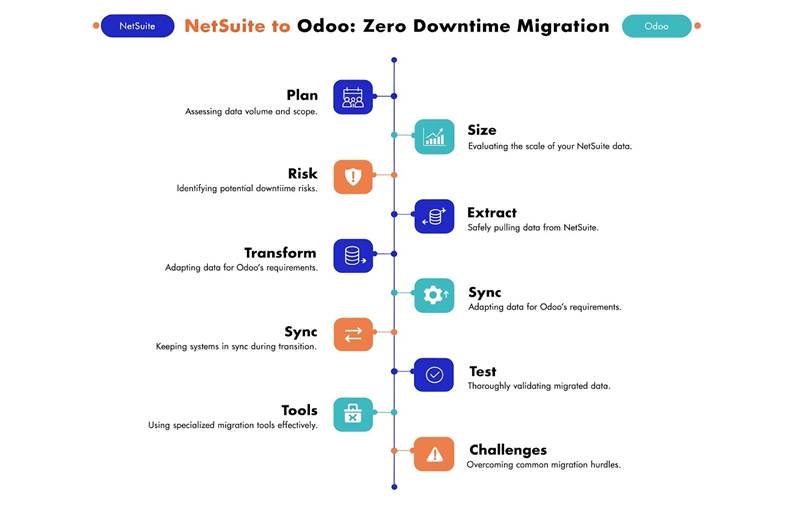
A successful migration needs clear workstreams. Each stage reduces risk, protects daily operations, and prepares your team for a smoother move into Odoo.
| 1. NetSuite Environment Review We review users, roles, modules, custom records, saved searches, SuiteScripts, integrations, reports, approval flows, and operational pain points. Outcome: A clear view of what must be protected during migration. | 2. Data Audit and Migration Planning We identify which data should be migrated, cleaned, archived, summarized, or excluded, including customers, vendors, products, accounts, open balances, and transactions. Outcome: A structured migration map from NetSuite data to Odoo records. |
| 3. Odoo Process Design We configure Odoo around your target operating model, including modules, permissions, workflows, approvals, automations, dashboards, and reporting logic. Outcome: An Odoo setup designed for how your team should work after migration. | 4. Integration Planning We review eCommerce, payments, shipping, payroll, banking feeds, CRM, BI tools, support platforms, APIs, and middleware. Outcome: A clear plan showing what should be rebuilt, replaced, improved, or retired. |
| 5. Test Migration and Validation We run test imports and validate real scenarios across finance, sales, purchasing, inventory, reporting, and integrations before go-live. Outcome: Fewer data issues, broken workflows, and reporting surprises after launch. | 6. Go-Live and Stabilization We plan the cutover, execute final migration activities, support users, resolve early issues, and monitor system performance. Outcome: A controlled launch with post-go-live support. |
Integration support: Odoo eCommerce, Payroll services, Data engineering, and AI automation services can support migration-dependent workflows.
Essential Planning Steps for a Smooth Migration
Planning is the difference between a controlled ERP transition and a disruptive system change. Before migration, define the project scope, timeline, stakeholder responsibilities, validation rules, and business-critical workflows.
| Assess data size and complexity Profile records, transaction history, custom fields, attachments, and reporting dependencies to estimate effort and timeline. | Define migration scope Decide what should move, what should be archived, and what should be rebuilt differently in Odoo. |
| Set downtime and rollback rules Create a cutover plan with rollback criteria, backup procedures, and escalation paths. | Run pilot migrations Test a smaller data set first to identify mapping issues, performance risks, and user adoption concerns. |
Extracting and Transforming Data for Odoo

Data migration is not only export and import. It is the process of preparing business records so they remain accurate, usable, and reportable inside Odoo.
Best Practices for NetSuite Data Extraction
- Use approved APIs, exports, or ETL tools based on project scope and data complexity.
- Schedule extraction during low-activity periods to reduce system load.
- Validate exported files before transformation begins.
- Create backups and maintain a record of extraction timestamps.
Data Mapping for Odoo
- Create mapping rules for customers, vendors, products, accounts, tax settings, open transactions, and inventory balances.
- Standardize naming, date formats, currencies, units of measure, and duplicate records before import.
- Use automated checks for high-risk areas such as payroll, accounting, and inventory valuation.
Strategies for Reducing Downtime
| Incremental migration Move data in stages instead of relying on one large cutover. | Real-time synchronization Keep selected records updated between NetSuite and Odoo until final cutover. | Test environments Validate migration logic in a sandbox before touching production workflows. |
| Off-peak cutover Schedule final sync and go-live when business activity is lowest. | Rollback planning Define when and how to return to NetSuite if critical issues appear. | User readiness Train users before go-live so adoption does not become the bottleneck. |
Testing and Validation Before Go-Live
Testing confirms that the migrated system works for real business use, not just for sample records. Validate the system with the people who rely on it every day.
| Data accuracy Compare source and target records, totals, balances, and transaction samples. | Workflow validation Test sales, purchasing, inventory, accounting, approvals, and reporting flows. |
| Access rights Confirm roles, permissions, approvals, and segregation of duties. | Performance Monitor load times, imports, exports, dashboards, and integration response times. |
| User acceptance Let business users test real scenarios and document issues before go-live. | Post-launch monitoring Track errors, adoption, support tickets, and system stability after launch. |
Tools That Make NetSuite to Odoo Integration Easier
The right tools improve migration speed, traceability, and validation. The toolset should match the project’s risk level, data complexity, and integration needs.
| API-driven extraction Moves data through controlled system interfaces. | ETL tools Transform and clean data before import into Odoo. | Validation scripts Compare migrated records against NetSuite source data. |
| Integration middleware Connects Odoo with eCommerce, payments, shipping, BI, CRM, and other systems. | AI-assisted mapping Helps identify mapping issues, duplicates, and unusual data patterns. | Reporting tools Verify operational and financial visibility after migration. |
Helpful related resources: Top Odoo migration services, Top Odoo development services companies, Bay Forward Odoo Canada, and Bay Forward Odoo Ireland.
Common Migration Challenges and How to Prevent Them
| Challenge | Prevention |
| Dirty or duplicated data | Clean and deduplicate before import, not after go-live. |
| Broken integrations | Document every connected system and test each integration before cutover. |
| Reporting gaps | Map saved searches, dashboards, KPIs, and finance reports early. |
| Scope creep | Control changes with approval rules and a migration backlog. |
| User resistance | Train users before launch and provide support during stabilization. |
| Unexpected downtime | Use pilot migrations, backups, rollback planning, and staged cutover. |
Comparison of Key Migration Strategies
| Migration Strategy | Purpose | Benefit |
| Real-time data synchronization | Keeps selected records updated between systems | Reduces data loss and improves continuity |
| Incremental data migration | Moves data in stages | Lowers risk and improves monitoring |
| API-driven extraction | Transfers data through system interfaces | Improves control and integration quality |
| Automated validation tools | Checks data after migration | Catches errors before go-live |
| Pilot migrations | Tests migration on a smaller scale | Finds issues before full cutover |
Frequently Asked Questions
What role do stakeholders play in ERP migration?
Stakeholders define requirements, confirm priorities, review test results, and approve go-live readiness. Their involvement keeps the migration aligned with real business needs.
How can businesses keep data safe during migration?
Use backups, access controls, encryption, approved transfer methods, and validation logs. Sensitive records should be handled with clear permissions and audit trails.
How should legacy data be handled?
Keep what is useful, archive what is outdated, and summarize historical data when full transaction migration is not required.
Why is moving data in stages useful?
Incremental migration reduces risk because teams can test, validate, and correct each phase before moving to the next.
How do you know the migration was successful?
Success can be measured through data accuracy, working integrations, stable performance, user adoption, correct reports, and minimal disruption after go-live.
What support is needed after migration?
Post-launch support should include issue resolution, user training, performance monitoring, integration checks, and workflow improvements.
Plan Your NetSuite to Odoo Migration with Bay Forward
A successful migration should protect business continuity while improving how your team works. Bay Forward can help you assess your NetSuite environment, design the right Odoo structure, migrate and validate data, test real workflows, and support go-live.
Next step: Book a NetSuite to Odoo migration assessment.
Additional Bay Forward resources: Odoo implementation partner, Odoo integration services, Power BI reporting and dashboards, and success stories.